> ## Documentation Index
> Fetch the complete documentation index at: https://docs.mogenius.com/llms.txt
> Use this file to discover all available pages before exploring further.
# Sandbox Templates
> The blueprint for a sandbox — base image, start command, security context, and whether the workspace is persistent or ephemeral.
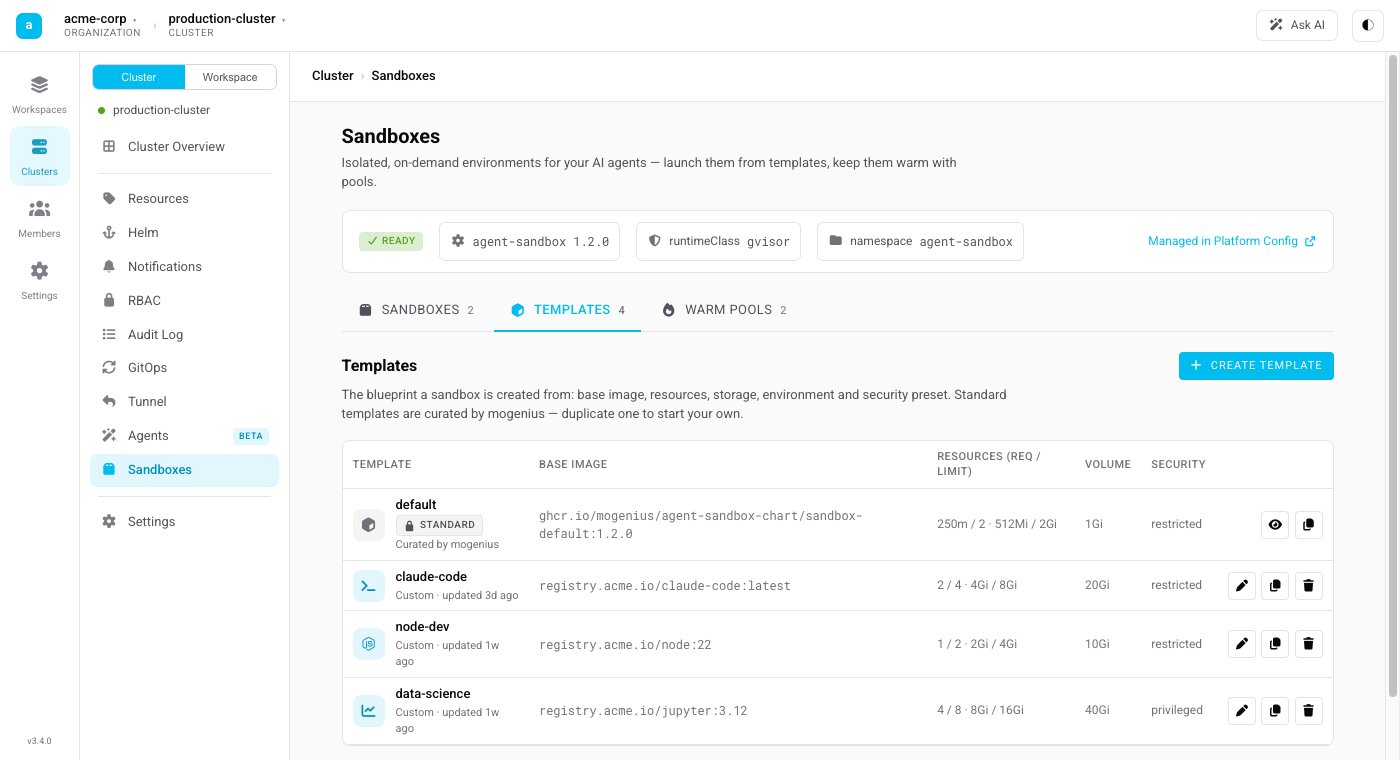
A **Sandbox Template** is the blueprint every sandbox is created from. Administrators maintain templates per cluster under **Cluster → Sandboxes → Templates**.
 ## What a template defines
* **Base image** — the container image a sandbox starts from, including the toolchain available inside it (a language runtime, build tools, your own image, and so on).
* **Start command** — the command the sandbox runs on start. Leave it to keep the image's default, or override it to launch a specific entrypoint.
* **Security context** — a preset that controls how privileged the sandbox is:
* **Restricted** — hardened defaults suitable for most workloads.
* **Privileged** — relaxed constraints for images that need them.
* **Workspace** — whether the working directory is **persistent** (backed by a volume, so files survive a stop/resume) or **ephemeral** (discarded when the sandbox ends).
## Standard vs. custom templates
* **Standard templates** are installed and kept up to date by the platform (managed through the Agent Sandbox component). They are read-only — a safe, supported starting point.
* **Custom templates** are the ones you create. Duplicate a standard template or start fresh, then adjust the image, command, security context, and workspace to fit your use case.
## Working with templates
From the Templates tab you can create, edit, duplicate, and delete custom templates. A template can be referenced by a [Warm Pool](/agent-sandbox/warm-pools) so that ready sandboxes are kept on hand for it.
Deleting a template that a warm pool still references is blocked — remove or repoint the warm pool first.
This documentation is built and hosted on [Mintlify](https://mintlify.com), a developer documentation platform.
## What a template defines
* **Base image** — the container image a sandbox starts from, including the toolchain available inside it (a language runtime, build tools, your own image, and so on).
* **Start command** — the command the sandbox runs on start. Leave it to keep the image's default, or override it to launch a specific entrypoint.
* **Security context** — a preset that controls how privileged the sandbox is:
* **Restricted** — hardened defaults suitable for most workloads.
* **Privileged** — relaxed constraints for images that need them.
* **Workspace** — whether the working directory is **persistent** (backed by a volume, so files survive a stop/resume) or **ephemeral** (discarded when the sandbox ends).
## Standard vs. custom templates
* **Standard templates** are installed and kept up to date by the platform (managed through the Agent Sandbox component). They are read-only — a safe, supported starting point.
* **Custom templates** are the ones you create. Duplicate a standard template or start fresh, then adjust the image, command, security context, and workspace to fit your use case.
## Working with templates
From the Templates tab you can create, edit, duplicate, and delete custom templates. A template can be referenced by a [Warm Pool](/agent-sandbox/warm-pools) so that ready sandboxes are kept on hand for it.
Deleting a template that a warm pool still references is blocked — remove or repoint the warm pool first.
This documentation is built and hosted on [Mintlify](https://mintlify.com), a developer documentation platform.