> ## Documentation Index
> Fetch the complete documentation index at: https://docs.mogenius.com/llms.txt
> Use this file to discover all available pages before exploring further.
# Using sandboxes
> Create and work with sandboxes from your workspace and the CLI — terminal, SSH, files, and ports, then stop or delete.
Developers work with sandboxes from their [workspace](/workspaces/creating-workspaces), under **Sandboxes**. Everything here runs within the isolation and RBAC an administrator configured — you get an environment to run code in, without touching your own machine.
## Create a sandbox
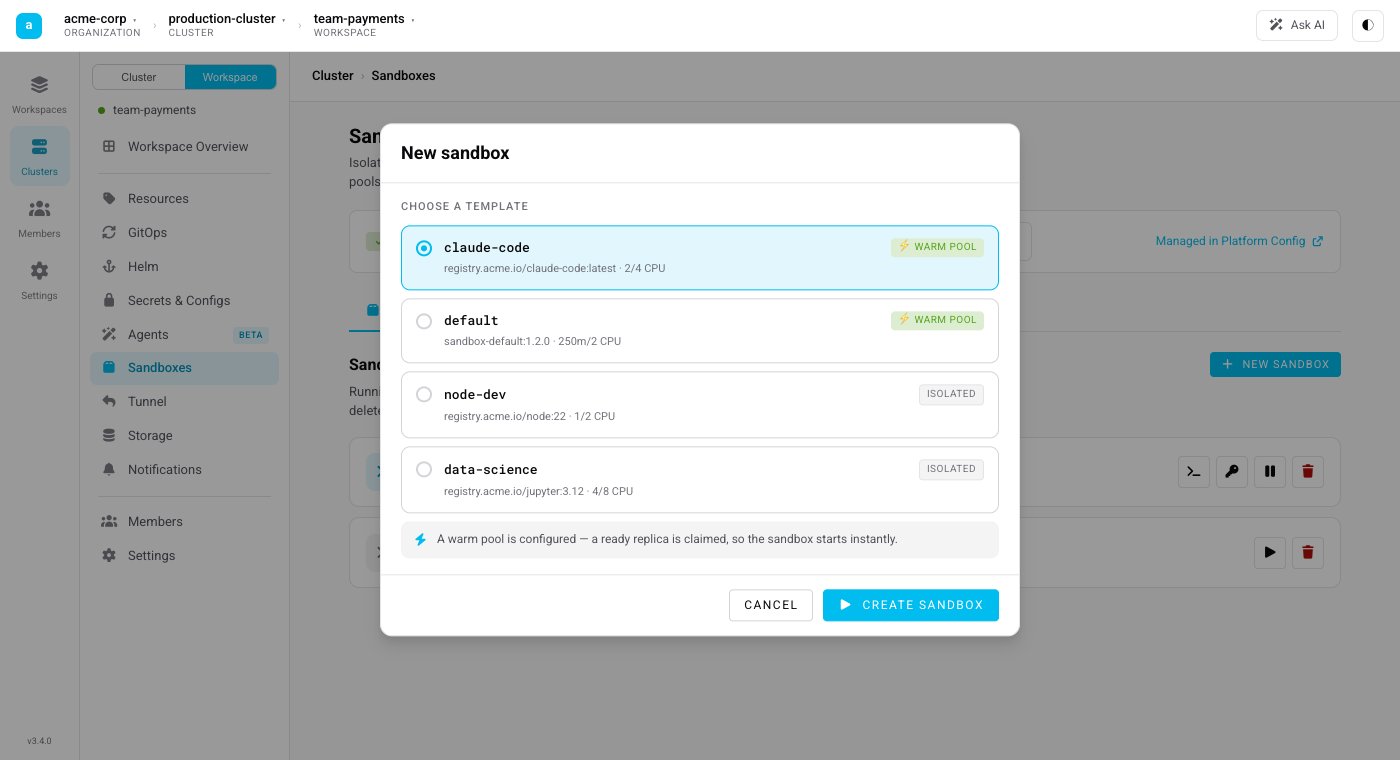
Creating a sandbox starts from a [template](/agent-sandbox/templates). You choose how it is provisioned:
* **From a warm pool** — claim a ready sandbox for the template. This is instant when the pool has capacity.
* **Isolated** — create a fresh sandbox on demand, independent of any warm pool.
 ## Work inside it
Once a sandbox is running you can:
* **Open a terminal** — an interactive shell straight to the sandbox in your browser.
* **Connect over SSH** — copy the SSH command to attach your local tools or an agent to the sandbox.
* **Move files** — upload and download files to and from the sandbox.
* **Expose ports** — reach a service running inside the sandbox through a preview link.
## Stop or delete
* **Stop** keeps the persistent workspace volume, so you can resume the environment later with its files intact.
* **Delete** tears the sandbox down completely.
## From the CLI
`mocli` can create a sandbox, list the ones you have, and drop you straight into one:
```bash theme={null}
# Create a sandbox and jump into it
mocli sandbox create
# List your sandboxes
mocli sandbox list
```
See the [mogenius CLI](/cli/overview) for installation and how contexts select the cluster and workspace you act on.
Prefer to drive sandboxes from your own code or an agent framework? Use the [SDK](/agent-sandbox/sdk) to create, exec, and tear down sandboxes programmatically.
This documentation is built and hosted on [Mintlify](https://mintlify.com), a developer documentation platform.
## Work inside it
Once a sandbox is running you can:
* **Open a terminal** — an interactive shell straight to the sandbox in your browser.
* **Connect over SSH** — copy the SSH command to attach your local tools or an agent to the sandbox.
* **Move files** — upload and download files to and from the sandbox.
* **Expose ports** — reach a service running inside the sandbox through a preview link.
## Stop or delete
* **Stop** keeps the persistent workspace volume, so you can resume the environment later with its files intact.
* **Delete** tears the sandbox down completely.
## From the CLI
`mocli` can create a sandbox, list the ones you have, and drop you straight into one:
```bash theme={null}
# Create a sandbox and jump into it
mocli sandbox create
# List your sandboxes
mocli sandbox list
```
See the [mogenius CLI](/cli/overview) for installation and how contexts select the cluster and workspace you act on.
Prefer to drive sandboxes from your own code or an agent framework? Use the [SDK](/agent-sandbox/sdk) to create, exec, and tear down sandboxes programmatically.
This documentation is built and hosted on [Mintlify](https://mintlify.com), a developer documentation platform.