

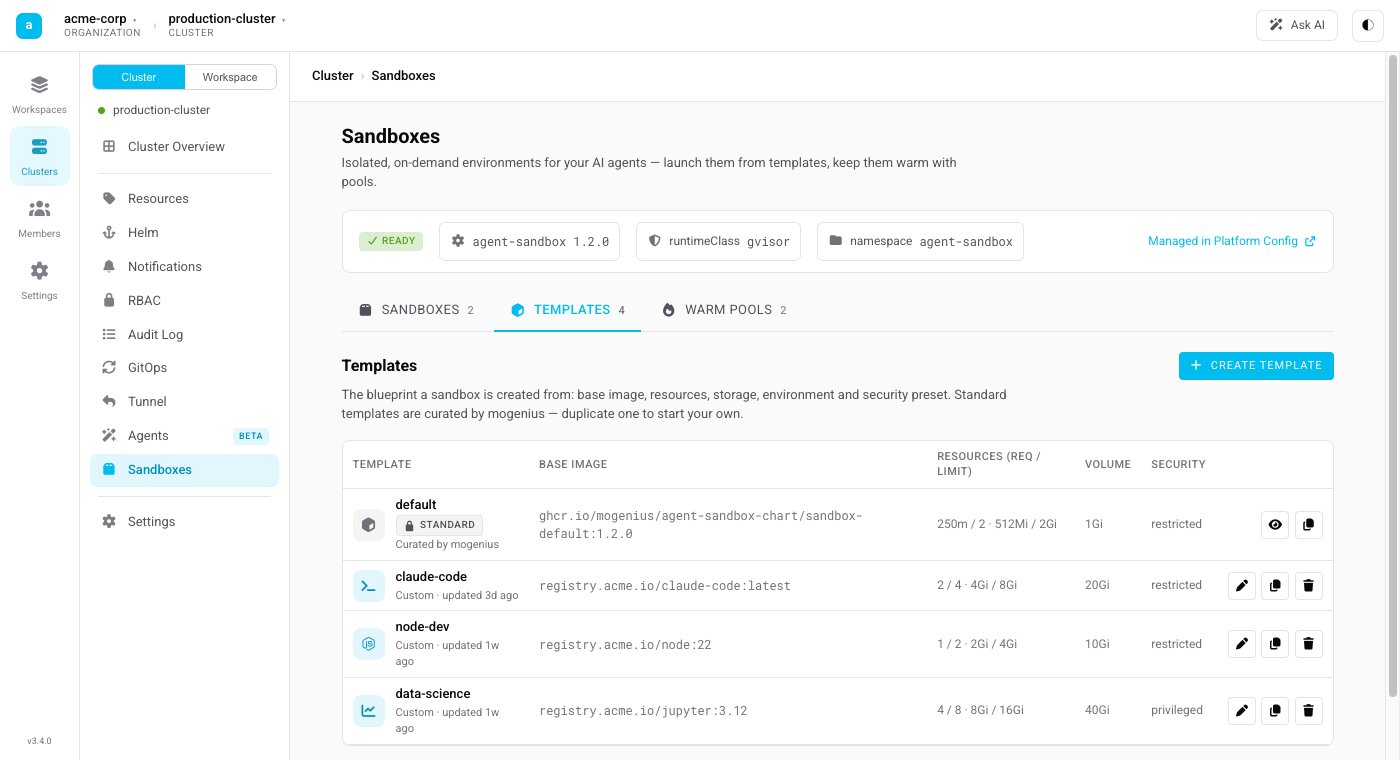
The Templates tab: a curated standard template (read-only) alongside custom templates, each with its base image, resources, workspace volume, and security preset.
What a template defines
- Base image — the container image a sandbox starts from, including the toolchain available inside it (a language runtime, build tools, your own image, and so on).
- Start command — the command the sandbox runs on start. Leave it to keep the image’s default, or override it to launch a specific entrypoint.
- Security context — a preset that controls how privileged the sandbox is:
- Restricted — hardened defaults suitable for most workloads.
- Privileged — relaxed constraints for images that need them.
- Workspace — whether the working directory is persistent (backed by a volume, so files survive a stop/resume) or ephemeral (discarded when the sandbox ends).
Standard vs. custom templates
- Standard templates are installed and kept up to date by the platform (managed through the Agent Sandbox component). They are read-only — a safe, supported starting point.
- Custom templates are the ones you create. Duplicate a standard template or start fresh, then adjust the image, command, security context, and workspace to fit your use case.
Working with templates
From the Templates tab you can create, edit, duplicate, and delete custom templates. A template can be referenced by a Warm Pool so that ready sandboxes are kept on hand for it.Deleting a template that a warm pool still references is blocked — remove or repoint the warm pool first.